
numberWidth of the item in [dp](https://en.wikipedia.org/wiki/Device-independent_pixel). See also: * [Pixels and dimensions](./boards#pixels-and-dimensions) *** ### height
numberHeight of the item in [dp](https://en.wikipedia.org/wiki/Device-independent_pixel). See also: * [Pixels and dimensions](./boards#pixels-and-dimensions) *** ### title
stringA short text header for the frame. The text must be shorter than 6000 characters. `title` supports only plain text. *** ### showContent
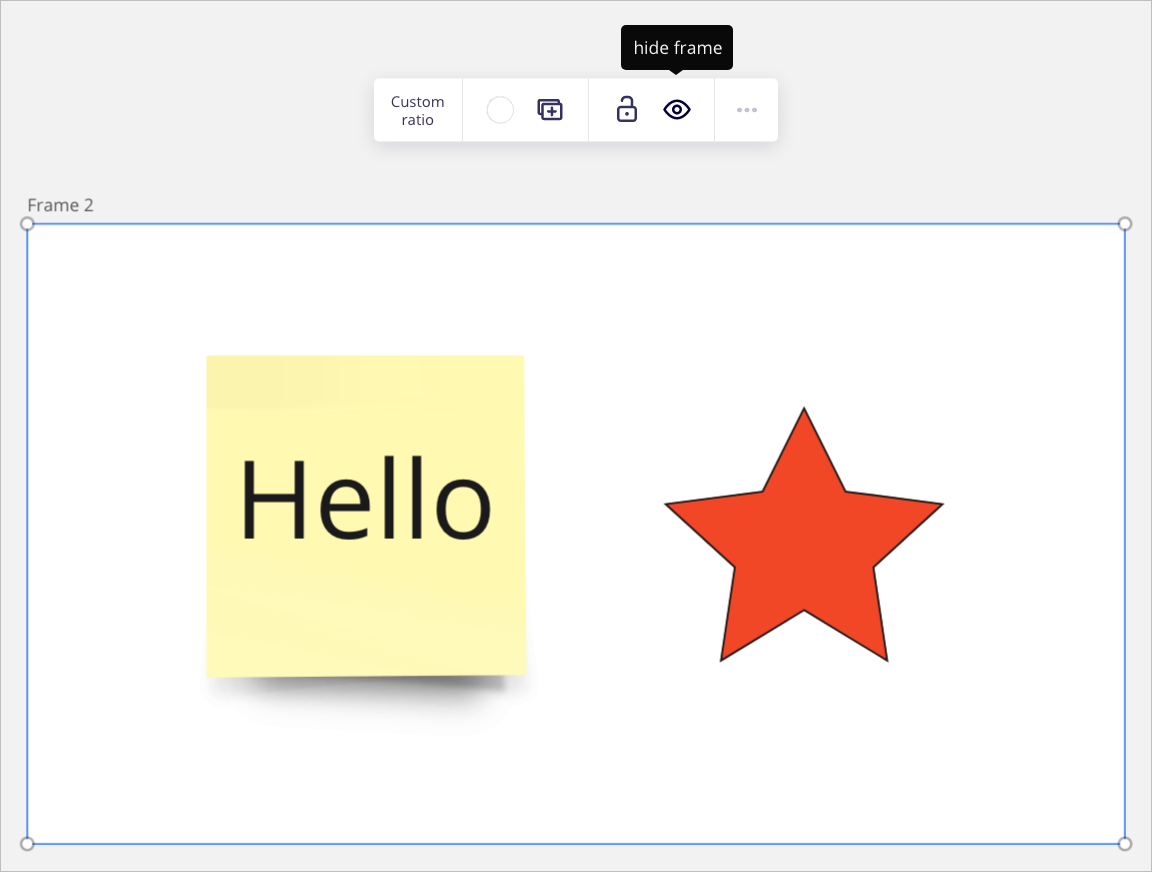
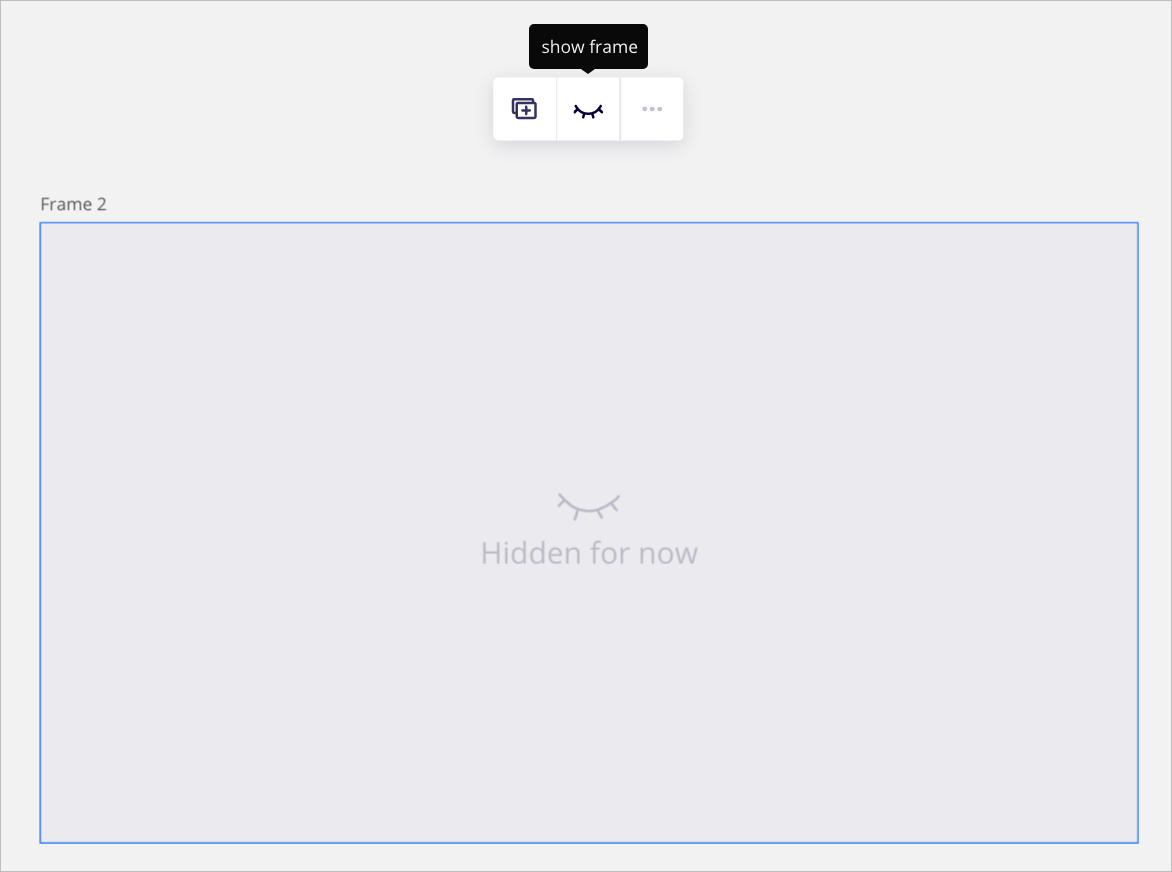
boolean`showContent` enables to programmatically hide or reveal the content inside a frame. The functionality works like the **show frame** and **hide frame** options available on the item context menu when the frame is selected on the board UI. `showContent` is a boolean property: * `showContent: true`: all the content inside the frame is visible. * `showContent: false`: all the content inside the frame is hidden. On the board UI, an overlay is displayed over the frame to visually notify board users that they cannot view the frame content. Default: `true` ℹ️ Note: * [Hiding and revealing the content inside frames](https://help.miro.com/hc/en-us/articles/360018261813-Frames#Hiding_and_revealing_frames) is only available to board owners and co-owners on Consultant and Enterprise plans. If your app attempts to toggle the visibility of content inside a frame with `showContent` for users who are on different subscription plans and who aren't board owners or co-owners, the operation throws an error.
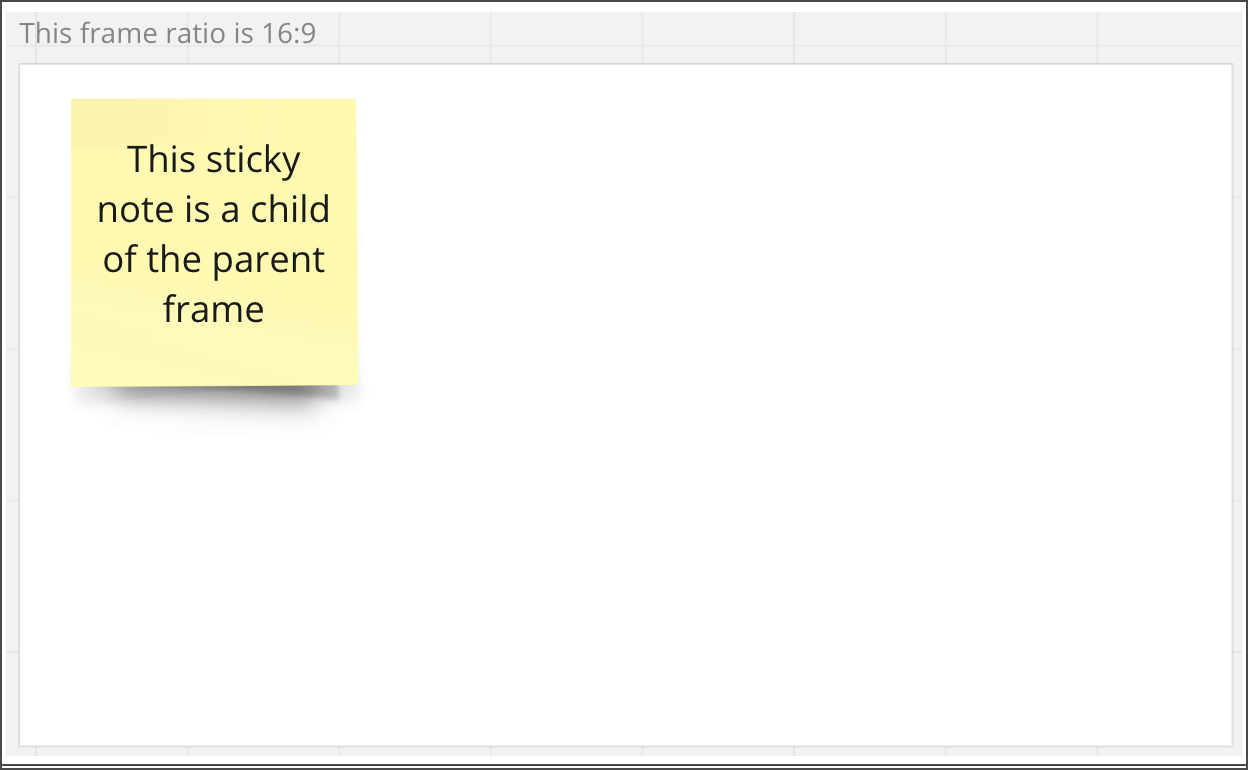
Array<string>An array of unique identifiers. The IDs represent child items inside the frame. They help retrieve child items inside a parent item. *** ### style
{ fillColor: string }
The `style` object groups properties that define the layout, the look and feel of specific elements of an item, when it's displayed on the board.
For example: background color, font family, font type, horizontal and vertical alignment of the text, text color, and so on.
The Miro Web SDK doesn't support all standard style, yet. Additional styles will be included in future releases.
`style` data structure:
#### `fillColor`
[Hex value](https://www.color-hex.com/) representing the [background color](https://htmlcolorcodes.com/) that fills the area of the frame.
Default: no fill (transparent background)
***
### id
readonly stringUnique ID of the item, assigned automatically upon creation. Example: `3658432978520043388` *** ### x
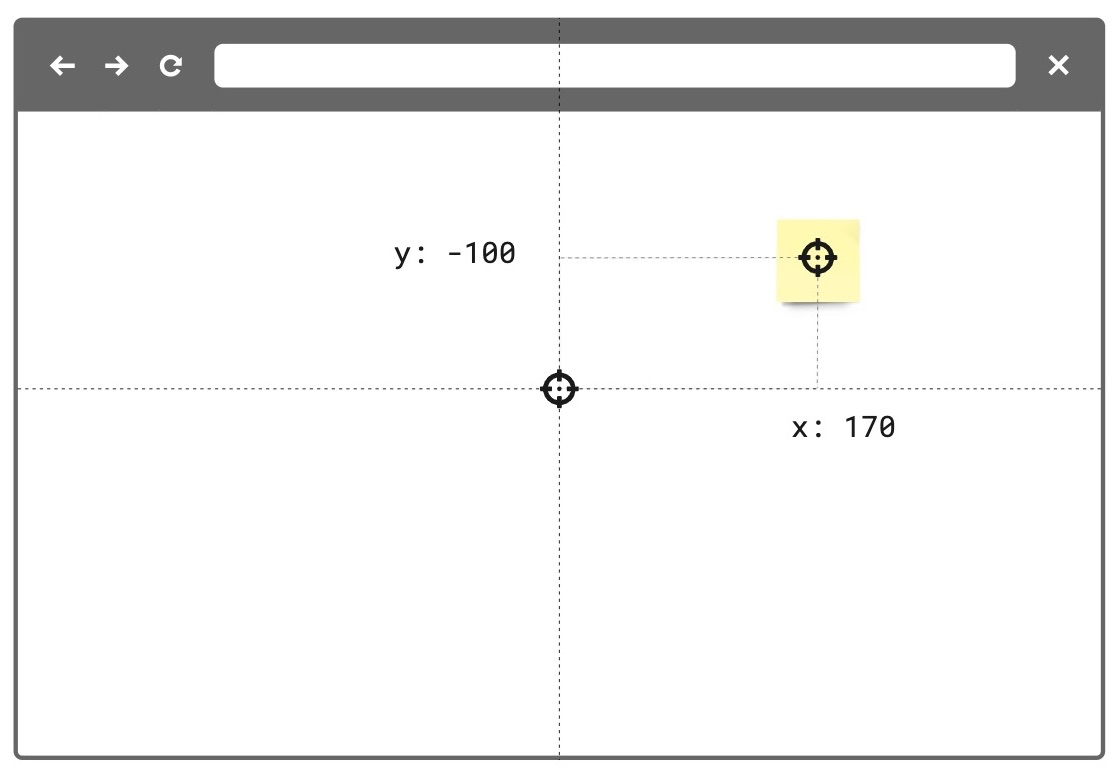
numberThe x-axis coordinate of an item is the horizontal distance in [dp](https://en.wikipedia.org/wiki/Device-independent_pixel) of the center point of the item from the center point of the board. The center point of the board has `x: 0` and `y: 0` coordinates. Default: `0` See also: * [Board coordinates](https://developers.miro.com/miro-ea/docs/boards#position-and-coordinates) * [`x` and `y`: `-Infinity`](https://developers.miro.com/miro-ea/docs/children-inside-parent-items#retrieval-of-unsupported-parent-with-children) *** ### y
numberThe y-axis coordinate of an item is the vertical distance in [dp](https://en.wikipedia.org/wiki/Device-independent_pixel) of the center point of the item from the center point of the board. The center point of the board has `x: 0` and `y: 0` coordinates. Default: `0` See also: * [Board coordinates](https://developers.miro.com/miro-ea/docs/boards#position-and-coordinates) * [`x` and `y`: `-Infinity`](https://developers.miro.com/miro-ea/docs/children-inside-parent-items#retrieval-of-unsupported-parent-with-children) *** ### type
readonly 'frame'Defines the [type of item](https://developers.miro.com/miro-ea/docs/board-items). Item type is useful to retrieve specific items from a board. For example, you can fetch all card and shape items from the board, and then carry out an action on them. Example: ```typescript // Get all items from the board const items = await miro.board.get(); // Count all card and shape items on the board let cards = 0; let shapes = 0; items.forEach((items) => { switch (items.type) { case 'card': cards++; case 'shape': shapes++; } }); // Output to the console the total amount of card and shape items console.log(`The current board has ${cards} cards and ${shapes} shapes.`); ``` *** ### parentId
readonly 'null' | stringIf an item is a child of another item, the child's `parentId` returns the unique identifier of the corresponding parent item. If an item has no parent, its `parentId` is `null`. You can use the value to retrieve a tree structure when items are nested inside containers. For example, sticky notes inside frames or text items inside mindmaps. *** ### origin
'center'`origin` marks: * The positioning reference point of a board item. This is the point used to calculate the `x` and `y` coordinates of an item when it's positioned [on the board](https://developers.miro.com/miro-ea/docs/boards#position-and-coordinates), or when it's a child inside a [parent item](https://developers.miro.com/miro-ea/docs/boards#position-relative-to-parent-items). * The rotation pivot point of a board item that supports [rotation](#rotation). `origin` accepts only one value: `center`. Any other value throws an error. *** ### relativeTo
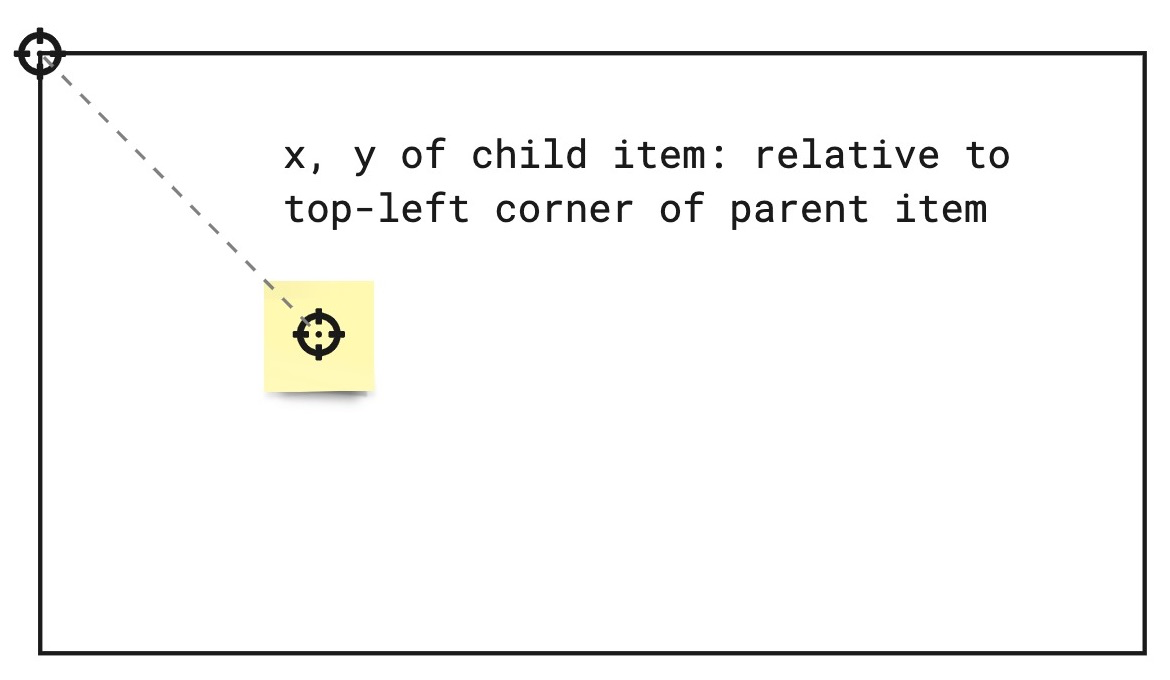
'canvas_center' | 'parent_top_left' | 'parent_center'The `relativeTo` property affects the `x` and `y` coordinate values of a board item. `relativeTo` defines the positioning reference of a board item, which can be: * [Relative to the board](https://developers.miro.com/miro-ea/docs/boards#position-relative-to-the-board) * [Relative to a parent item](https://developers.miro.com/miro-ea/docs/boards#position-relative-to-parent-items) Depending on whether an item is a child of a parent item or not, `relativeTo` can have one of the following values: | Value | Description | On the board UI | | :---------------- | :----------------------------------------------------------------------------------------------------------------------------------------------------------------------------------------------------------------------------------------------------------------------------------------------------------------------------------------------------------- | :------------------------------------------------------------------------------------------------------------------------------------------------------------------------------------------------------------------------------------------------------------------------------------------------------------------------------: | | `canvas_center` | The item is positioned on the board, and it's not a child of another item.
 Experimental feature**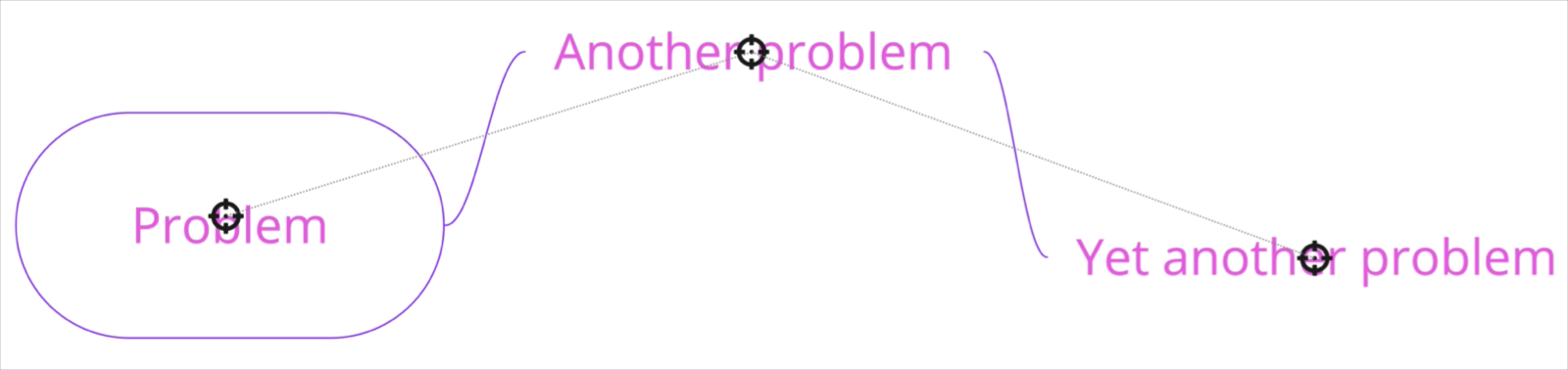
string`linkedTo` is the namespace that enables links to be associated to items on the board. When this property is utilized, the associated item will display an arrow icon on its top right corner. On click, this icon will navigate to the associated link. For links that point to another item on the same board, the viewport will automatically move to that item when `true` is returned. For links that point to an item on a separate board or an external url, a new tab tab will be opened. > **Note:** Items of type `tag` do not support the `linkedTo` property. To link an item to another item on the same board, a valid url with an item id must be specified: ```typescript const [geoCard] = await miro.board.get({type: 'card'}); const widgetId = `00000000000000000`; const boardId = 'xxxxxxxxxxx'; // Generate url based on boardId and widgetId geoCard.linkedTo = `https://miro.com/app/board/${xxxxxxxxxxx}/?moveToWidget=${widgetId}`; // OR you can use relative URL geoCard.linkedTo = `/app/board/${xxxxxxxxxxx}/?moveToWidget=${widgetId}`; // OR you can generate url based on current URL by simply change of query param const searchParams = new URLSearchParams(window.location.search); searchParams.set('moveToWidget', widgetId); const newRelativePathQuery = `${window.location.pathname}?${searchParams.toString()}`; geoCard.linkedTo = newRelativePathQuery; ``` To unlink an item to the provided url, set the property to `undefined` or pass an empty string `""`: ```typescript const [geoCard] = await miro.board.get({type: 'card'}); // Unlink the widget geoCard.linkedTo = ''; // or geoCard.linkedTo = undefined; await geoCard.sync(); console.log(geoCard.linkedTo); // will return empty string: '' ``` *** ### createdAt
readonly stringTimestamp Date and time when the item was created. Format: UTC, [ISO 8601](https://en.wikipedia.org/wiki/ISO_8601). Includes a [trailing Z offset](https://en.wikipedia.org/wiki/ISO_8601#Coordinated_Universal_Time_\(UTC\)). Example: `2021-05-18T07:59:01Z` ℹ️ Note: * Timestamps indicating creation and update times are [always in UTC time](https://time.is/UTC), regardless of the time offset configured on the machine where the app runs or where the code is executed. *** ### createdBy
readonly stringMiro users are automatically assigned a unique ID. `createdBy` contains the ID of the user who created the item. Example: `3658432978520043388` *** ### modifiedAt
readonly stringTimestamp Date and time when the item was last modified. Format: UTC, [ISO 8601](https://en.wikipedia.org/wiki/ISO_8601). Includes a [trailing Z offset](https://en.wikipedia.org/wiki/ISO_8601#Coordinated_Universal_Time_\(UTC\)). Example: `2021-05-18T07:59:01Z` ℹ️ Note: * Timestamps indicating creation and update times are [always in UTC time](https://time.is/UTC), regardless of the time offset configured on the machine where the app runs or where the code is executed. *** ### modifiedBy
readonly stringMiro users are automatically assigned a unique ID. `modifiedBy` contains the ID of the user who applied the most recent edit to the item. Example: `3658432978520043388` ## Methods ### add(...)
(item: T) => Promise<T>##### 🔒 Requires scope: [boards:write](https://developers.miro.com/reference/scopes#boardswrite "boards:write") Adds an item to a frame as a child. The frame becomes the corresponding parent. The `add()` method takes a [board item](https://developers.miro.com/miro-ea/docs/board-items) as an argument. To add a board item to a frame with `add()`, the item to add must: * Exist on the board. * Be located inside the frame. `add()` establishes a parent/child relationship between the containing frame and the items inside it. After calling `add()`: * The `parentId` of the child item corresponds to the parent frame ID. * The child item ID is added to the frame `childrenIds` array. * The `x` and `y` coordinates of the child item are recalculated [relative to the top-left corner of the parent frame](https://developers.miro.com/miro-ea/docs/boards#position-relative-to-parent-items). This enables repositioning a frame on the board along with its children, as they keep the same relative position inside the parent frame. It also affects the positioning reference of the child item, because its `x` and `y` values are no longer relative to the center of the board. After adding an item to a frame, the `x` and `y` coordinates of the child item inside the parent frame mark the center point of the child, [relative to the top-left corner of the parent frame](https://developers.miro.com/miro-ea/docs/boards#position-relative-to-parent-items). Adding a board item to a frame as a child can fail if: * The parent frame doesn't exist. * The child item is located outside the bounds of the parent frame. * The child item is already a child inside a different frame. *** ### remove(...)
(item: T) => Promise<void>##### 🔒 Requires scope: [boards:write](https://developers.miro.com/reference/scopes#boardswrite "boards:write") Removes a child item from a frame. The method removes the parent-child relationship between the items. Both items still exist on the board as independent, detached items. This affects the positioning reference of the item, because its `x` and `y` values are no longer relative to the top-left corner of the frame. After removing an item from a frame, the item's `x` and `y` coordinates mark the center point of the item, [relative to the center of the board](https://developers.miro.com/miro-ea/docs/boards#position-relative-to-board). The `frame.remove()` method takes an [item](https://developers.miro.com/miro-ea/docs/board-items) as an argument. The promise that the method returns can fail if: * The child item you're trying to remove doesn't exist. * The item you're trying to remove isn't a child of the frame. * The frame doesn't exist. Example: ```typescript // Create a frame. const frame = await miro.board.createFrame({ title: 'this frame ratio is 16:9', style: { fillColor: '#FFFFFF', }, width: 800, height: 450, x: 4100, y: 4200, }); // Create a text item, and position it inside the frame. const text = await miro.board.createText({ content: 'this is a piece of text', style: { fillColor: '#fff9b1', // Light yellow }, x: frame.x + 180, y: frame.y + 10, }); // Create a shape item, and position it inside the frame. const shape = await miro.board.createShape({ width: 200, height: 250, x: frame.x + 20, y: frame.y + 50, style: { fillColor: '#FF0000', }, }); // Add the text and the shape items as children of the parent frame. await frame.add(text); await frame.add(shape); // Move the frame on the board. // The children items move along with the frame: // their coordinates are relative to the top-left corner of the frame. frame.x = -400; frame.y = -500; await frame.sync(); // Update the child shape position inside the frame // by specifying relative coordinates. const shapes = await miro.board.get({type: 'shape'}); await Promise.all( shapes.map((child) => { child.x += 150; child.y += 200; return child.sync(); }), ); // Remove the parent/child relationship between frame and text item. await frame.remove(text); // Move the frame on the board. // The text item doesn't move along with the frame: // its coordinates are relative to the center of the board. frame.x += 400; frame.y += 500; await frame.sync(); // Remove the text item from the board await miro.board.remove(text); // Remove the frame from the board await miro.board.remove(frame); ``` *** ### getChildren(...)
() => Promise<Array<ContainableItem>>##### 🔒 Requires scope: [boards:read](https://developers.miro.com/reference/scopes#boardsread "boards:read") ##### 🚦 Rate limit: [Level 3](https://developers.miro.com/docs/rate-limiting "3") Returns an array containing all the child items inside a parent frame. If a frame has no children, the method returns an empty array. Example: ```typescript // Specify all frame items on the board let frames = await miro.board.get({type: 'frame'}); // Log to the console the child items of the frames for (const frame of frames) { const children = await frame.getChildren(); console.log(children); } ``` *** ### sync
() => Promise<void>##### 🔒 Requires scope: [boards:write](https://developers.miro.com/reference/scopes#boardswrite "boards:write") `sync` propagates to the board any changes to item and tag properties. After updating the properties of an item or a tag, sync it with the board to: * Propagate to the board the changes applied to the item or to the tag. * Make the changes visible on the board. All board items and tags require `sync` to make any changes to their properties visible on the board. For more information and examples, see [Update and sync item properties](https://developers.miro.com/miro-ea/docs/update-and-sync-item-properties). Example: *(The code example updates a text item using `sync`. The same mechanism applies to and works in the same way for all supported board items.)* ```typescript // Create an item. // In this case, a text item. const text = await miro.board.createText({ content: '
This is a piece of text to remind me that I always finish what I ...
', style: { fillColor: 'transparent', textAlign: 'left', }, x: 0, y: 0, width: 450, rotation: 0.0, }); // Update the board item by modifying the values of its properties. // In the text item case, the updated properties modify content, background color, and rotation of the item. text.content = 'A fourteneer is "A line that rumbles on like this for being a bit too long."'; text.style.fillColor = '#a9fe65'; text.rotation = 180.0; // Call 'sync' to make the changed board item properties visible on the board. await text.sync(); // Output the updated board item to the developer console. console.log(text); ``` Example: *(The code example updates a tag using `sync`. The same mechanism applies to and works in the same way for all supported board items.)* ```typescript // Create a tag. const todo = await miro.board.createTag({ title: 'todo', color: 'yellow', }); // Create a sticky note and attach the tag to it. const stickyNote = await miro.board.createStickyNote({ content: 'sticky note with tag: "todo"', tagIds: [todo.id], }); console.log(stickyNote.tagIds); // => ['3074457345627244742'] // Update the tag properties: title and color. todo.title = "won't fix"; todo.color = 'green'; // Call 'sync' to make the changed tag properties visible on the board. await todo.sync(); // Output the updated tag to the developer console. console.log(todo); ``` *** ### getMetadata(key: string) => Promise<T>##### 🔒 Requires scope: [boards:read](https://developers.miro.com/reference/scopes#boardsread "boards:read") ##### 🚦 Rate limit: [Level 1](https://developers.miro.com/docs/rate-limiting "1") Fetches board item metadata, stored per app, for the specified metadata key. The response contains the metadata value assigned to the requested key. To fetch all the metadata for a board item, invoke the method without passing any arguments. The response contains all the metadata associated with the board item as key/value pairs. An app can access only the metadata that it sets. It cannot access metadata set by other apps. [`getMetadata`](https://developers.miro.com/miro-ea/docs/websdk-reference-board#getMetadata) and [`setMetadata`](https://developers.miro.com/miro-ea/docs/websdk-reference-board#setMetadata) are available for the following board items: * Card * Connector * Embed * Image * Preview * Shape * Sticky note * Text The methods aren't available for the following board items: * Frames * [Unsupported board items](https://developers.miro.com/miro-ea/docs/websdk-reference-unsupported#) * [groups](https://developers.miro.com/miro-ea/docs/websdk-reference-group#) ℹ️ Note: * To [access board item metadata](https://developers.miro.com/miro-ea/docs/websdk-reference-board#getMetadata), apps require the [`boards:read`](https://developers.miro.com/miro-ea/reference/scopes) permission. * To [store board item metadata](https://developers.miro.com/miro-ea/docs/websdk-reference-board#setMetadata), apps require the [`boards:write`](https://developers.miro.com/miro-ea/reference/scopes) permission. * `getMetadata` returns a new object, not a reference to the object that was previously set with [`setMetadata`](https://developers.miro.com/miro-ea/docs/websdk-reference-board#setMetadata). * If the specified key isn't found, the method returns `undefined`. ⚠️ Warning: * Total `ItemMetadata` storage limit: `6 KB` per item. Example: ```typescript // Get the board item you want to retrieve metadata from. const [geoCard] = await miro.board.get({type: 'card'}); // Set item metadata for an imaginary geocaching game, and store it to the retrieved card item. await geoCard.setMetadata('leaderboard', ['Ziltoid', 'Howard', 'Paul']); // Get the specific 'leaderboard' metadata from the card item. const leaderboard = await geoCard.getMetadata('leaderboard'); // Get all the metadata from the card item by passing no arguments. await geoCard.getMetadata(); ``` *** ### setMetadata
(key: string, value: title="Json">Json) => Promise<T>##### 🔒 Requires scope: [boards:write](https://developers.miro.com/reference/scopes#boardswrite "boards:write") Adds board item metadata to make it available on the board that the app runs on. An app can access only the board item metadata that it sets. It cannot access metadata set by other apps. Board item metadata is stored in the item it refers to. Therefore: * When duplicating an item, the metadata is copied to the new item. * When deleting an item, the corresponding metadata is removed with the deleted item. Board item metadata is synced across, and available to, all the users who can: * Access and view the board that the app is running on, AND * Run the app on the board. `ItemMetadata` is a key/value-pair object. It can contain values with the following data types: * `string` * `number` * `boolean` * `Object` * `Array` * `null` * `undefined` [`getMetadata`](https://developers.miro.com/miro-ea/docs/websdk-reference-board#getMetadata) and [`setMetadata`](https://developers.miro.com/miro-ea/docs/websdk-reference-board#setMetadata) are available for the following board items: * Card * Connector * Embed * Image * Preview * Shape * Sticky note * Text The methods aren't available for the following board items: * Frames * [Unsupported board items](https://developers.miro.com/miro-ea/docs/websdk-reference-unsupported#) * [groups](https://developers.miro.com/miro-ea/docs/websdk-reference-group#) To overwrite an existing key inside `ItemMetadata`: * Pass the same key multiple times with different values. Only the last/most recent value is stored with the key. To remove a key from `ItemMetadata`: * Set the value of the existing key to either `null`, or `undefined`. This clears the key. If you call `getMetadata(key)` to retrieve a key that has been set to `null` or `undefined`, the method returns `undefined`. ℹ️ Note: * To [access board item metadata](https://developers.miro.com/miro-ea/docs/websdk-reference-board#getMetadata), apps require the [`boards:read`](https://developers.miro.com/miro-ea/reference/scopes) permission. * To [store board item metadata](https://developers.miro.com/miro-ea/docs/websdk-reference-board#setMetadata), apps require the [`boards:write`](https://developers.miro.com/miro-ea/reference/scopes) permission. * You can assign an empty array (`[]`) to a key. It's returned as an empty array. * You can assign an empty string (`''`) to a key. It's returned as an empty string. ⚠️ Warning: * Total `ItemMetadata` storage limit: `6 KB` per item. Example: ```typescript // Get the board item you want to set metadata to. const [geoCard] = await miro.board.get({type: 'card'}); // Set item metadata for an imaginary geocaching game, and store it to the retrieved card item. await geoCard.setMetadata('geoData', { name: 'null', coordinates: { latitude: '33.950278', longitude: '-105.314167', }, lastFound: '1947-07-08', content: true, difficulty: 5, keywords: ['x-files', 'truth-is-out-there', 'area-51', 'roswell', 'aliens'], geoCache: [ { name: 'UFO', description: 'Severely damaged unidentified flying object. ', }, { name: 'Alien', description: 'Remains of an alien life form.', }, { name: 'Artifacts', description: 'Tools, equipment, and other items found at the crash site.', }, { name: 'Edibles', description: 'The alien was likely as high as a kite when they crashed. Typical.', }, ], }); // Get the specific 'geoData' metadata from the card item. // The response contains the metadata value assigned to the key. const geoCardGeoData = await geoCard.getMetadata('geoData'); // Get all the metadata from the card item. // The response contains all the metadata assigned to the board item as key/value pairs. const geoCardAllMetaData = await geoCard.getMetadata(); // Clear the metadata about the imaginary geocaching game in one of the following ways: // 1. Assign 'geoData' an empty object. await miro.board.setMetadata('geoData', {}); // 2. Set 'geoData' to 'undefined'. await miro.board.setMetadata('geoData', undefined); // 3. Set 'geoData' to 'null'. await miro.board.setMetadata('geoData', null); ``` *** ### goToLink
() => Promise<boolean>##### 🔒 Requires scope: [boards:read](https://developers.miro.com/reference/scopes#boardsread "boards:read") `goToLink` navigates to the provided link associated with the item on a board. For links that point to another item on the same board, the viewport will automatically move to that item when `true` is returned. For links that point to an item on a separate board or an external url, a new tab tab will be opened. Returns: `Promise`<`boolean`> * `true`: Link is successfully associated with the item, navigation is triggered, and the `linkedTo` property contains a valid value. * `false`: Link is not successfully associated to the item due to an invalid or missing `linkedTo` property, and no navigation is triggered. Example: ```typescript const [geoCard] = await miro.board.get({type: 'card'}); // Link item to some url geoCard.linkedTo = 'https://google.com'; // Update widget props and apply changes await geoCard.sync(); // Navigate to https://google.com (value of `linkedTo` property) await geoCard.goToLink(); ``` *** ### bringToFront
() => Promise<void>##### 🔒 Requires scope: [boards:write](https://developers.miro.com/reference/scopes#boardswrite "boards:write") ##### 🚦 Rate limit: [Level 1](https://developers.miro.com/docs/rate-limiting "1") In a stack of items, this method brings an item to the front so that it is at the top of the stack. When the item is at the front, it is fully visible; The item can partially or completely hide underlying items in the same stack. ℹ️ Note: * [Frame](https://developers.miro.com/miro-ea/docs/websdk-reference-frame#) items don't support the `bringToFront()` method. As a frame item acts as a parent that can contain other items, a frame item is always at the back, relative to any other items on the board. The only object behind a frame is the board itself. Example: ```typescript // Create three sticky notes const first = await miro.board.createStickyNote({ content: 'first', }); const second = await miro.board.createStickyNote({ content: 'second', }); const third = await miro.board.createStickyNote({ content: 'third', }); // Bring the first sticky note to the front of the board. await first.bringToFront(); ``` *** ### sendToBack
() => Promise<void>##### 🔒 Requires scope: [boards:write](https://developers.miro.com/reference/scopes#boardswrite "boards:write") ##### 🚦 Rate limit: [Level 1](https://developers.miro.com/docs/rate-limiting "1") In a stack of items, it sends an item to the back so that it is at the bottom of the stack. When it is at the back, item is partially or completely hidden by overlying items in the same stack. ℹ️ Note: * [Frame](https://developers.miro.com/miro-ea/docs/websdk-reference-frame#) items don't support the `sendToBack()` method. As a frame item acts as a parent that can contain other items, a frame item is always at the back, relative to any other items on the board. The only object behind a frame is the board itself. Example: ```typescript // Create three sticky notes const first = await miro.board.createStickyNote({ content: 'first', }); const second = await miro.board.createStickyNote({ content: 'second', }); const third = await miro.board.createStickyNote({ content: 'third', }); // Send the third sticky note to the back of the board await third.sendToBack(); ``` *** ### bringInFrontOf
(target: BaseItem) => Promise<void>##### 🔒 Requires scope: [boards:write](https://developers.miro.com/reference/scopes#boardswrite "boards:write") ##### 🚦 Rate limit: [Level 1](https://developers.miro.com/docs/rate-limiting "1") In a stack of items, this method sends an item in front of another item (target). When an item is moved to the front, the item can partially or completely hide underlying items in the same stack. ℹ️ Note: * As this method implements relative positioning, you can use this method to place items in front or behind other items. If you want to send an item all the way to the front, you can use the method [`bringToFront()`](#bringtofront), which places the item at the top of the stack. * [Frame](https://developers.miro.com/miro-ea/docs/websdk-reference-frame#) items don't support the `bringInFrontOf()` method. As a frame item acts as a parent that can contain other items, a frame item is always at the back, relative to any other items on the board. The only object behind a frame is the board itself. Example: ```typescript // Create three sticky notes const first = await miro.board.createStickyNote({ content: 'first', }); const second = await miro.board.createStickyNote({ content: 'second', }); const third = await miro.board.createStickyNote({ content: 'third', }); // Bring the first sticky note in front of second. await first.bringInFrontOf(second); ``` *** ### sendBehindOf
(target: BaseItem) => Promise<void>##### 🔒 Requires scope: [boards:write](https://developers.miro.com/reference/scopes#boardswrite "boards:write") ##### 🚦 Rate limit: [Level 1](https://developers.miro.com/docs/rate-limiting "1") In a stack of items, this method sends an item behind another item (target). When an item is moved to the back, the item can be partially or completely hidden by the overlying items in the top of the same stack. ℹ️ Note: * As this method implements relative positioning, you can use this method to place items in front or behind other items. If you want to send an item all the way to the back, you can use the method [`sendToBack()`](#sendtoback), which places the item at the bottom of the stack. * [Frame](https://developers.miro.com/miro-ea/docs/websdk-reference-frame#) items don't support the `sendBehindOf()` method. As a frame item acts as a parent that can contain other items, a frame item is always at the back, relative to any other items on the board. The only object behind a frame is the board itself. Example: ```typescript // Create three sticky notes const first = await miro.board.createStickyNote({ content: 'first', }); const second = await miro.board.createStickyNote({ content: 'second', }); const third = await miro.board.createStickyNote({ content: 'third', }); // Send the third sticky note behind the second one await third.sendBehindOf(second); ``` *** ### getLayerIndex
() => Promise<number>##### 🔒 Requires scope: [boards:read](https://developers.miro.com/reference/scopes#boardsread "boards:read") The `getLayerIndex()` method returns the position of an item in the item stack. Items in a stack are layered on top of each other based on their layer index value. An item with a higher layer index appears above items with lower layer index values. Each item on the board has a layer index position in the stack. The higher the layer index value, the "closer" to the user the item appears. For example, with three items on the board - `first`, `second`, and `third` - their initial layer index values might be: `first[0]`, `second[1]`, `third[2]`. The item with `layerIndex === 2` (`third`) will be fully visible at the top of the stack. The item with `layerIndex === 1` (`second`) may be partially hidden by the item above it. And the item with `layerIndex === 0` (`first`) may be fully hidden by the items above it. Returns: * `Promise
() => Promise<Array<Connector>>##### 🔒 Requires scope: [boards:read](https://developers.miro.com/reference/scopes#boardsread "boards:read") ##### 🚦 Rate limit: [Level 3](https://developers.miro.com/docs/rate-limiting "3") The `getConnectors()` method returns an array of connector items attached to the current item. The connectors returned correspond to the ids in the `connectorIds` property of the item. Example: ```typescript // Create two sticky notes linked by a connector. const startItem = await miro.board.createStickyNote({ content: 'start', }); const endItem = await miro.board.createStickyNote({ content: 'end', x: 500, }); const connector = await miro.board.createConnector({ start: { item: startItem.id, }, end: { item: endItem.id, }, }); // sync() updates the connectorIds property in startItem await startItem.sync(); const connectors = await startItem.getConnectors(); // returns [connector] ``` ## All properties
| Property | Type |
|---|---|
childrenIds |
Array<string> |
connectorIds? |
readonly Array<string> |
createdAt |
readonly string |
createdBy |
readonly string |
groupId? |
readonly string |
height |
number |
id |
readonly string |
linkedTo? |
string |
modifiedAt |
readonly string |
modifiedBy |
readonly string |
origin |
'center' |
parentId |
readonly 'null' | string |
relativeTo |
'canvas_center' | 'parent_top_left' | 'parent_center' |
showContent |
boolean |
style |
{ fillColor: string }
|
title |
string |
type |
readonly 'frame' |
width |
number |
x |
number |
y |
number |
add(...) |
(item: T) => Promise<T> |
bringInFrontOf(...) |
(target: BaseItem) => Promise<void> |
bringToFront(...) |
() => Promise<void> |
getAiContext(...) |
() => Promise<string> |
getChildren(...) |
() => Promise<Array<ContainableItem>> |
getConnectors(...) |
() => Promise<Array<Connector>> |
getLayerIndex(...) |
() => Promise<number> |
getMetadata(...) |
(key: string) => Promise<T> |
goToLink(...) |
() => Promise<boolean> |
remove(...) |
(item: T) => Promise<void> |
sendBehindOf(...) |
(target: BaseItem) => Promise<void> |
sendToBack(...) |
() => Promise<void> |
setMetadata(...) |
(key: string, value: title="Json">Json) => Promise<T> |
sync(...) |
() => Promise<void> |