---
updatedAt: 2026-03-19T19:38:55.000Z
agentTools:
projectIndex: https://developers.miro.com/llms.txt
---
# Tag
**Tag**
Tags use text to label [card](https://developers.miro.com/miro-ea/docs/websdk-reference-card#) and [sticky note](https://developers.miro.com/miro-ea/docs/websdk-reference-sticky-note#) items.
Tags help classify and categorize information to make it easier to retrieve.
After [creating a tag](https://developers.miro.com/miro-ea/docs/websdk-reference-board#createTag) on a [board](https://developers.miro.com/miro-ea/docs/websdk-reference-board#), you can attach it to the following items:
* [Cards](https://developers.miro.com/miro-ea/docs/websdk-reference-card#)
* [Sticky notes](https://developers.miro.com/miro-ea/docs/websdk-reference-sticky-note#)
ℹ️ Note:
* [`title`](https://developers.miro.com/miro-ea/docs/websdk-reference-tag#title) is required.
* If no [`color`](https://developers.miro.com/miro-ea/docs/websdk-reference-tag#color) is specified, it defaults to `red`.
* [Card](https://developers.miro.com/miro-ea/docs/websdk-reference-card#) and [sticky note](https://developers.miro.com/miro-ea/docs/websdk-reference-sticky-note#) items can have *up to 8 tags*.
* [Boards](https://developers.miro.com/miro-ea/docs/websdk-reference-board#) can have *up to 100 tags* in total.
Example:
```typescript
// Create a tag
const todo = await miro.board.createTag({
title: 'todo or not todo, that is the question',
color: 'yellow',
});
// Create a sticky note and attach the tag to it
const stickyNote = await miro.board.createStickyNote({
content: "sticky note with tag: 'todo'",
tagIds: [todo.id],
});
// Get the ID of the tag attached to the item
console.log(stickyNote.tagIds); // => ['3074457345627244742']
// Output the created item to the developer console
console.log(todo);
```
Tag attached to a sticky note:
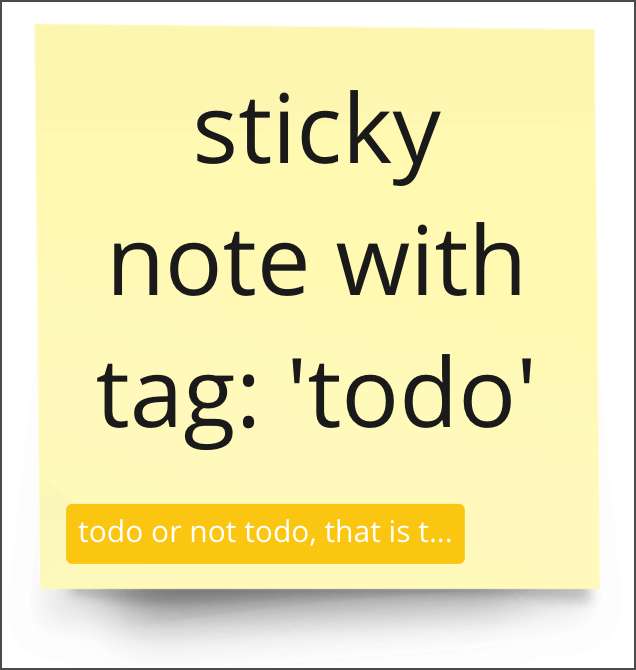
**Figure 1.** A tag attached to a sticky note.
## Properties
### type
readonly 'tag'
### id
readonly string
### title
string
The text to label [card](https://developers.miro.com/miro-ea/docs/websdk-reference-card#) and [sticky note](https://developers.miro.com/miro-ea/docs/websdk-reference-sticky-note#) items with.
The `title` property has the following characteristics:
* Alphanumeric, space, special characters (non-alphanumeric characters; for example: `! @ # $ % ˆ & *`), emojis
* Case-sensitive
* Must be unique
* Maximum length: 120 characters, spaces included.
### color
'red' | 'magenta' | 'violet' | 'light_green' | 'green' | '...'
A literal value that assigns a color to the background of the tag. Possible values:
* [`red`](https://www.color-hex.com/color/f24726)
* [`magenta`](https://www.color-hex.com/color/da0063)
* [`violet`](https://www.color-hex.com/color/9510ac)
* [`light_green`](https://www.color-hex.com/color/cee741)
* [`green`](https://www.color-hex.com/color/8fd14f)
* [`dark_green`](https://www.color-hex.com/color/0ca789)
* [`cyan`](https://www.color-hex.com/color/12cdd4)
* [`blue`](https://www.color-hex.com/color/2d9bf0)
* [`dark_blue`](https://www.color-hex.com/color/414bb2)
* [`yellow`](https://www.color-hex.com/color/fac710)
* [`gray`](https://www.color-hex.com/color/808080)
* [`black`](https://www.color-hex.com/color/1a1a1a)
Default: [`red`](https://www.color-hex.com/color/f24726)
## Methods
### sync(...)
() => Promise<void>
##### 🔒 Requires scope: [boards:write](https://developers.miro.com/reference/scopes#boardswrite "boards:write")
##### 🚦 Rate limit: [Level 1](https://developers.miro.com/docs/rate-limiting "1")
`sync` propagates to the board any changes to item and tag properties.
After updating the properties of an item or a tag, sync it with the board to:
* Propagate to the board the changes applied to the item or to the tag.
* Make the changes visible on the board.
All board items and tags require `sync` to make any changes to their properties visible on the board.
For more information and examples, see [Update and sync item properties](https://developers.miro.com/miro-ea/docs/update-and-sync-item-properties).
Example:
*(The code example updates a tag using `sync`.
The same mechanism applies to and works in the same way for all supported board items.)*
```typescript
// Create a tag.
const todo = await miro.board.createTag({
title: 'todo',
color: 'yellow',
});
// Create a sticky note and attach the tag to it.
const stickyNote = await miro.board.createStickyNote({
content: 'sticky note with tag: "todo"',
tagIds: [todo.id],
});
console.log(stickyNote.tagIds); // => ['3074457345627244742']
// Update the tag properties: title and color.
todo.title = "won't fix";
todo.color = 'green';
// Call 'sync' to make the changed tag properties visible on the board.
await todo.sync();
// Output the updated tag to the developer console.
console.log(todo);
```
## All properties
| Property | Type |
|---|
color |
'red' | 'magenta' | 'violet' | 'light_green' | 'green' | '...'
|
id |
readonly string
|
title |
string
|
type |
readonly 'tag'
|
sync(...) |
() => Promise<void>
|
# Sibling pages
* [Interact with boards and items](https://developers.miro.com/miro-ea/docs/websdk-reference-interact-with-boards-and-items.md)
* [Rate limiting](https://developers.miro.com/miro-ea/docs/websdk-reference-rate-limiting.md)
* [Error handling](https://developers.miro.com/miro-ea/docs/websdk-reference-error-handling.md)
* [Board](https://developers.miro.com/miro-ea/docs/websdk-reference-board.md)
* [Card](https://developers.miro.com/miro-ea/docs/websdk-reference-card.md)
* [Board UI](https://developers.miro.com/miro-ea/docs/websdk-reference-ui.md)
* [Viewport](https://developers.miro.com/miro-ea/docs/websdk-reference-viewport.md)
* [Notifications](https://developers.miro.com/miro-ea/docs/websdk-reference-notifications.md)
* [App card](https://developers.miro.com/miro-ea/docs/websdk-reference-app-card.md)
* [Experimental](https://developers.miro.com/miro-ea/docs/websdk-reference-experimental.md)
* [Realtime Events](https://developers.miro.com/miro-ea/docs/websdk-reference-events.md)
* [Custom Action Management](https://developers.miro.com/miro-ea/docs/websdk-reference-custom-action-management.md)
* [Shape](https://developers.miro.com/miro-ea/docs/websdk-reference-shape.md)
* [Frame](https://developers.miro.com/miro-ea/docs/websdk-reference-frame.md)
* [Image](https://developers.miro.com/miro-ea/docs/websdk-reference-image.md)
* [Sticky Note](https://developers.miro.com/miro-ea/docs/websdk-reference-sticky-note.md)
* [Shape experimental](https://developers.miro.com/miro-ea/docs/websdk-reference-shape-experimental.md)
* [Embed](https://developers.miro.com/miro-ea/docs/websdk-reference-embed.md)
* [Connector](https://developers.miro.com/miro-ea/docs/websdk-reference-connector.md)
* [Unsupported](https://developers.miro.com/miro-ea/docs/websdk-reference-unsupported.md)
* [Mindmap Node](https://developers.miro.com/miro-ea/docs/websdk-reference-mindmap-node.md)
* [Preview](https://developers.miro.com/miro-ea/docs/websdk-reference-preview.md)
* [Text](https://developers.miro.com/miro-ea/docs/websdk-reference-text.md)
* [Storage collection](https://developers.miro.com/miro-ea/docs/websdk-reference-collection.md)
* [Storage](https://developers.miro.com/miro-ea/docs/websdk-reference-storage.md)
* [Collaboration](https://developers.miro.com/miro-ea/docs/websdk-reference-collaboration.md)
* [Session](https://developers.miro.com/miro-ea/docs/websdk-reference-session.md)
* [Attention](https://developers.miro.com/miro-ea/docs/websdk-reference-attention.md)
* [Group](https://developers.miro.com/miro-ea/docs/websdk-reference-group.md)
* [History](https://developers.miro.com/miro-ea/docs/websdk-reference-history.md)
* [Tools](https://developers.miro.com/miro-ea/docs/websdk-reference-tools.md)