

Updated Submission Process for the Miro Marketplace
To maintain a high-quality, secure, and user-focused ecosystem, we've updated how developers submit apps to the Miro Marketplace. Going forward, only developers who apply through our Partner Interest Form and are approved by the Partnerships team are eligible to submit an app for review.
What's changing
- To submit an app to the Miro Marketplace, you must first complete the Partner Interest Form.
- The Miro Partnerships team will review your submission and decide whether to move forward with the partnership.
- Only approved partners will receive a link to submit their app listing assets for review.
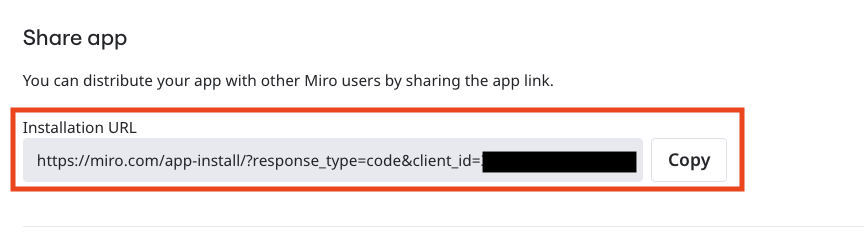
This change doesn't affect apps you build for internal use or distribute privately — it only applies to apps you want to publish publicly on the Miro Marketplace. To distribute apps you can simply use the installation URL in your app settings and share that as you wish.
What helps you get approved as a partner
We prioritize partnerships with developers who can show clear data-driven evidence of demand and value to Miro users. Your chances of approval are higher when you can show:
- Customer demand — evidence that Miro users are actively asking for your integration or solution.
- A working app — your app is already built, deployed, and fully functional (not just a concept or prototype).
- Existing customer traction — your app is already in use by multiple customers, ideally supported by usage data, testimonials, or case studies.
- Strong fit with the Miro ecosystem — your app enhances core Miro use cases such as workshops, agile ceremonies, research, product development, or team collaboration.
How to distribute and grow your app on your own
Not getting approved (yet) doesn't mean your app can't reach users. Many
successful Miro apps started by building an audience independently and later
qualified for the Marketplace by demonstrating real customer demand and traction.
Step 1 — Get your installation URL
In your app settings, scroll to Share app and copy the Installation URL.
Anyone with this link can install your app directly into their Miro account, no
Marketplace listing required.
Step 2 — Build a home for your app
Create a simple landing page that explains what your app does, who it's for,
and includes a "Try it out" button pointing to your Installation URL. You don't
need a custom site — a Notion page, Webflow site, or single-page GitHub Pages
site works. For inspiration, see how PlusUIDesign
markets their portfolio of Miro, Figma, and Adobe Express apps from a single
landing page.
Step 3 — Drive demand
These channels tend to work well for early-stage Miro apps:
- Communities — Share in Miro-relevant subreddits (r/Miro, r/UXDesign,
r/agile), Slack/Discord servers for PMs, designers, agile coaches, and
facilitators, and LinkedIn groups in your target niche. - Content — Write a blog post or tutorial showing the problem your app
solves inside a real Miro workflow (e.g. "How to run a better retro in Miro").
Aim for SEO-friendly titles people are already searching for. - Video — A 60–90s Loom or YouTube demo embedded on your landing page
significantly improves conversion. - Directories — Product Hunt, BetaList, AlternativeTo, and design-tool
newsletters can drive a meaningful first wave of users. - Direct outreach — If you built the app for a specific persona (e.g.
agile coaches), reach out 1:1 to 20–30 of them with a short demo video
and your install link. Early case studies are gold.
Step 4 — Re-apply when you have traction with real customers
Track installs, active users, and customer feedback. Once you can show real
demand — usage numbers, testimonials, paying customers, or case studies —
you'll be in a much stronger position when you submit through the Partner Interest Form again.